Showing posts with label maps. Show all posts

Monday, 9 November 2015

Premier league poverty, 2015

Over the past decade I've spent a lot of time looking at patterns of deprivation across the UK. One thing I've often noticed is the way football grounds regularly appear in the very poorest neighbourhoods. I've blogged on this topic a few times in the past, most notably in 2012 when I looked at the location of English Premier League grounds in relation to the deprivation level of their areas. I also noticed this in relation to the Scottish Index of Multiple Deprivation when looking at the East End of Glasgow in 2009. Given the history of football, its industrial working class origins, the development of British cities, and land values (to name just a few factors), none of this should be a surprise. But since a new English deprivation dataset was released in September, I wanted to revisit the topic and make a few maps, just to see if anything has changed. That's what I've done here - one map showing the location of each Premier League ground and the deprivation level of the area it sits in - and its wider neighbourhood. Further explanation follows below.

Note the blue area to the north east - now Highbury Square

Most areas in the neighbourhood are in the 20% most deprived

Bournemouth is the one big exception - it's at the opposite end of the scale

Stamford Bridge is in a much more mixed area than most

Selhurst Park sits right beside some more deprived areas

Goodison and Anfield look very similar  - only about half a mile apart

The wider area of Leicester's ground is more mixed

This is quite typical of much of north Liverpool

Manchester City play in the most deprived area of any top flight team

Manchester United are situated in a more mixed land use area

Newcastle United's pitch is split between areas - I've based this on majority area

Norwich City's ground is also in a more mixed neighbourhood

St Mary's is situated in one of the city's most deprived zones

Stoke also play in quite a deprived area - though there's more variation nearby

Like many newer stadiums, this ground is in a slightly more mixed area

The Welsh deprivation dataset is used here - but similar story to be told

Post-riots, much has been said of regeneration in this area of London

Watford play in a much less deprived locality

West Brom's ground is in the most deprived decile of England

Another ground split between areas - but still more deprived than not

What does all this tell us?
The most obvious thing to emerge from this simple mapping exercise is that more than half of all Premier League grounds are located in areas among the 20% most deprived in the country, but a good few are not. Two in particular - Bournemouth and Watford - are in much less deprived areas. Nonetheless, if you scroll through the maps quickly, the main colour you'll see is red (for the 20% most deprived). When I see stories in the news about the ability of sport to tackle deprivation, I'm generally all for it, but then sometimes I make a mental comparison between the wage bills of some teams and the neighbourhoods they're located in and I think we've barely scratched the surface of what's possible when we talk of the potential for elite sport to help transform poorer areas. Post-Olympics, this has kind of been forgotten. Having said this, it is good to see that the Premier League and FA's Football Foundation provides money for grass roots development in the most deprived areas as defined by this very same dataset. 


What does it not tell us?
Quite a lot, and I wouldn't want anyone to think that I've done this to pick on any one team. I'm just curious about the relationship between these football grounds and underlying patterns of deprivation because when I look at the data as I map it, I often notice the stadia. It doesn't tell us anything about cause and effect, whether teams are trying to do anything to boost the fortunes of their local areas or what the areas themselves are like to live in. If you want to know more about the underlying data, read this briefing from the Government. Does having a Premier League football team in your area make you poor? Of course not. 


Some of the grounds look the wrong shape - why?
I used building footprint data from the Ordnance Survey in the maps above and the shapes of the grounds are as they were in the original dataset - with the exception of Vicarage Road, which for some reason wasn't enclosed on one side so I made my own version. I've just added a little glow around each ground to make it stand out and then added in the footprints of all other buildings in the wider neighbourhood to help people identify nearby features and roads.


What about when a ground is split between areas?
I could have taken the average deprivation rank here and used that figure but instead I chose to use the deprivation rank of the area that the majority of the playing surface was located in. This was only really an issue for Arsenal, Newcastle and West Ham - and only really notable in Newcastle. 


Explain that 'deprivation percentile' thing again please
In England, there are 32,844 areas known as Lower Super Output Areas. These LSOAs are small areas which the government use to report all kinds of statistics, including Census data. When they publish their Indices of Deprivation, they give each one of the 32,844 areas a rank, from 1 (most deprived in England) to 32,844 (least deprived in England). Therefore, it's a relative measure that allows us to compare one area with another, all across the country. The data are often split into five or ten chunks (quintiles or deciles) for reporting purposes but here I've decided to use 'percentiles' as it's more precise. If an area is in percentile 5, it's among the 5% most deprived in England, and so on. If it's in percentile 95 (like Bournemouth's ground) then we can say it's not very deprived at all and actually highly likely to be a very affluent area. In the case of Swansea City, I've used Welsh deprivation data from 2014. This classifies places in almost exactly the same way, although there are 1,909 areas in Wales rather than 32,844. These areas have an average population of around 1,600.


Isn't this all just pointless area classification?
You might think so, but the Government use these Indices to make all sorts of important decisions, in healthcare and education for example. If you're in an area classified as being among the 20% most deprived, for example, you might find that you're eligible for some kind of funding - there are loads of examples of uses, with sport being one of many. You can find quite a few other examples in section 1.4 (p. 8) of this report. We must also remember that not all people living in areas classified as 'deprived' or 'not deprived' match that description - this dataset classifies areas not people.


When are you going to expand this to include my team?
I'm not planning to, but I'm sure it would be even more interesting than the Premier League.


Curiosities
On all the maps, north is up so I couldn't help notice that Manchester United seem to be the only team playing on an east to west pitch. I'm guessing most grounds don't do this so that they can avoid the setting sun problem - and in fact Old Trafford cricket ground rotated their pitch 90 degrees to avoid this problem in 2010. Shades of blue - representing the 40% least deprived areas - appear on only 7 of the maps, and only two grounds are in such areas. Red (20% most deprived areas) appear on 19 maps - only Watford is the exception. The maps for Everton, Man City, Tottenham and West Brom are entirely red - which indicates that these grounds and surrounding areas (a few hundred metres in each direction) are within wider areas classified as the most deprived in England. The very most deprived areas to appear on any of the maps are ranked 24 (beside Goodison) and 29 (beside Anfield). 


Which team do you support?
ICTFC, of course. But not very enthusiastically. 


Wednesday, 28 October 2015

Mapping property conditions in Detroit

I've written here a couple of times before about Detroit, in relation to my family history and my interest from a data/urban point of view. Last year I did a short piece on the amazing Motor City Mapping project, a comprehensive effort to digitize the city's property information and provide clear data which can help the city move forward. In the first phase of the project 150 Detroiters surveyed the entire city (about 380,000 land parcels) and this information was used in the Blight Elimination Task Force's report. You can read more about all this here. This post is about mapping the results of their work and property conditions in particular. Properties are categorised as being in 'good', 'fair', or 'poor' condition, or else demolition is suggested. I mapped this for all 54 of the city's neighbourhoods, as in the image below.

One of the 54 maps I created for the City of Detroit


The 'neighbourhoods' I used are the 54 'Master Plan Neighborhoods' provided by Data Driven Detroit, and available here as open data. For each area I've shown the proportion of properties in each category, in addition to the total number of structures for each area. The image above shows the Mt. Olivet neighbourhood to the north of the city, whereas the map below shows Chadsey, to the south of the city. One of the points I wanted to make here is that although Detroit has its problems - well documented - it's not necessarily the burning relic that some portray it to be. Anyone looking for an insight into all of this would do well to listen to fifth generation Detroiter George Galster's Driving Detroit lecture (which he also gave here in Sheffield last year).


Detroit is mostly 'good' - see, it's not so bad!

The other reason that I'm returning to the topic is because I teach using this fantastic dataset. It's fascinating in itself but it's also a great example of how cities can create, and then use, open data to help turn things around - or at least begin to. Half the battle is knowing where to start and the Motor City Mapping project provided a solid base for this.

My family history has always been tied to Detroit and although I've never lived there every time I've visited I liked what I saw and the people were really friendly. I'm probably biased but aren't we all? Last winter I found a few pieces of Detroit history in the family archives, which I'll share here as they are a little slice of the city that no longer exists. First, one of my grandparents' wedding photos, from late 1929, then a description of the event from a Scottish paper - followed by a photo of the Danish Brotherhood Hall mentioned in the piece. 

1920s style!

Yes, they had Comic Sans in 1929...

The 'Danish Brotherhood Hall'

Note in the image above of the Danish Brotherhood Hall a Danish flag has actually been painted over and if you look at it on Google Street View you can see the 'DB' inscription on the building's upper centre section. Detroit Urbex published a really fascinating history of this building, which is well worth a read. Anyway, it's interesting for me that the story of Detroit, as it were, is also wrapped up a little bit in my family history and can be seen in the images associated with my grandparents' wedding.

Back to the maps - I've shared them all via Google Drive so that anyone can access them and use then if they so wish. 

Property condition maps for all 54 neighborhoods

The only other thing to say is that if you download the original dataset you'll see that each land parcel also has a URL with a photo of it - quite an achievement when you realise there are nearly 380,000 of them. 

Friday, 19 June 2015

Creating an English green belt atlas

UPDATE: I've fixed the glitches in version 1 and compiled a spreadsheet with the data. See new download at the bottom of the post.

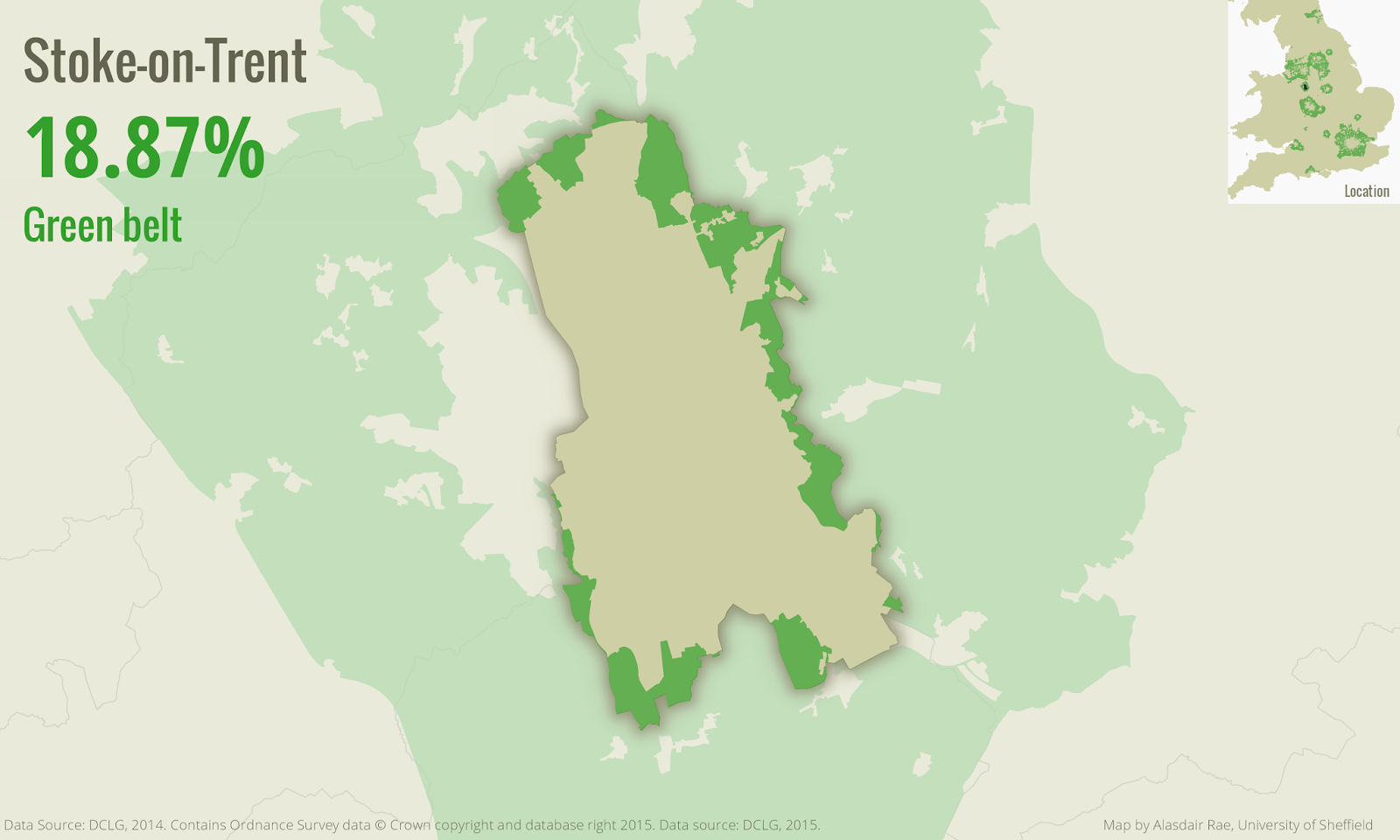
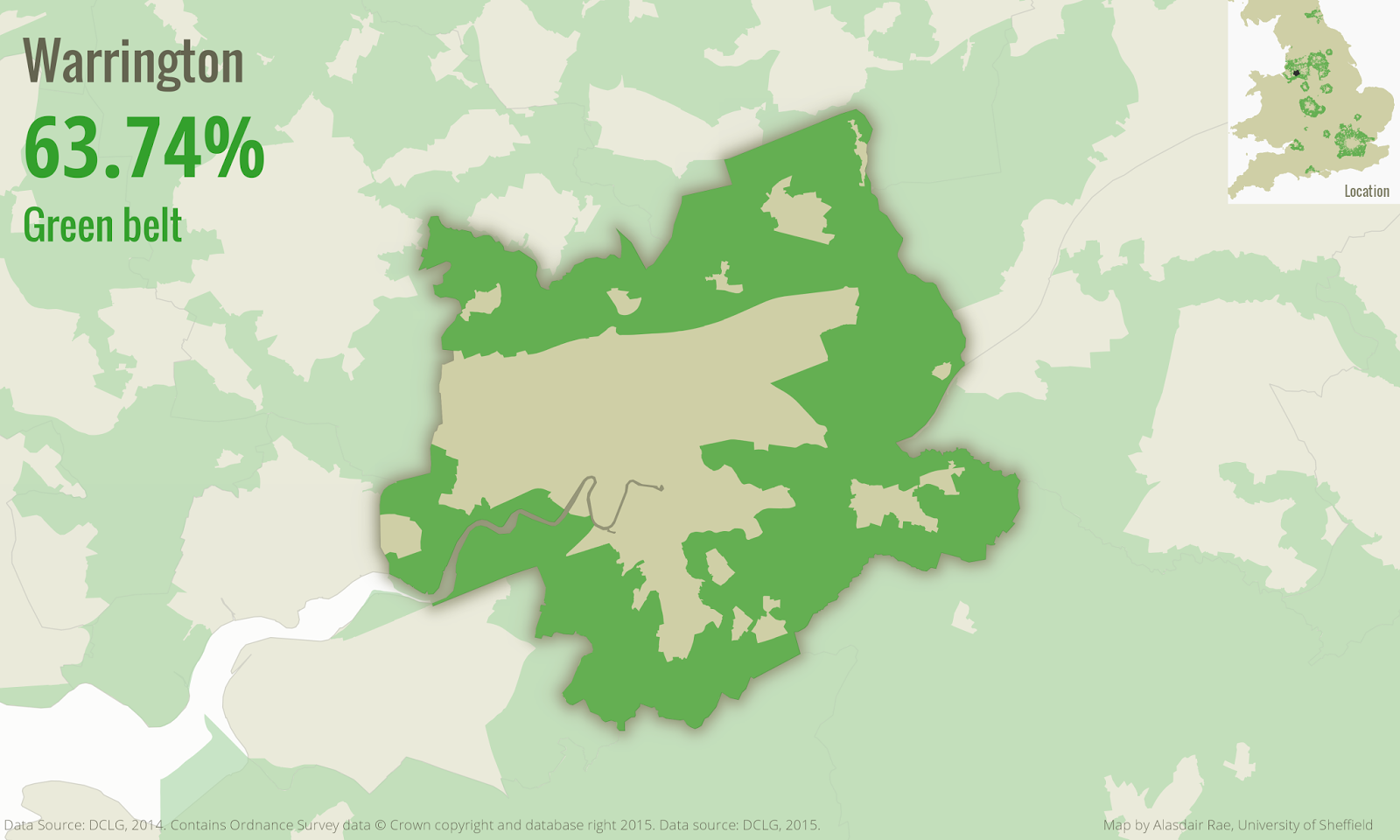
I've blogged before about green belt, and also written about the underlying data in the press. Now that the data are open, I've finally got round to finishing a little project I meant to complete ages ago. I was prompted to do this during a recent visit to my department by Prof Bob Barr, a legend in the data and GIS worlds. Bob said it would be good to know what percentage of the land area in each local authority in England was covered by green belt. I agree, so here are the results of my analysis (using 2014 green belt data) from Version 1 of my English green belt 'atlas' (actually lots of individual images to keep the file size down). Here's a snapshot of one of the maps...

Green belt land in Cheshire East

And another, this time from Birmingham. You can see that I've dimmed the background so that you can get a sense of other green belt land in the areas I've mapped.

Birmingham green belt land

Finally, a few more from around the country...


There are some glitches in the data but my initial overview suggests the numbers are pretty accurate (see exceptions below). I hope that people might find these maps useful. If you want to use any of them, be my guest.

Download all the files here (154MB): Green Belt Atlas 2014 (version 2) (186 individual map files, plus spreadsheet)

Download just the spreadsheet: percent green belt figures for each of the 186 local authorities:

Contents of the spreadsheet (download above)


Warnings: A couple of issues with version 1... 1. The West Lancashire greenbelt area extends into the sea on the green belt shapefile available from DCLG, so the figures here are incorrect (working on a fix). 2. The figure for Ashfield is clearly wrong - not sure why, so I will fix that too. 3. Some areas have extremely low values and may not actually be in the green belt - it may instead be down to the accuracy of underlying data. 4. Mole Valley currently missing, am looking into why. UPDATE: I looked again at the original Green Belt shapefile from DCLG and found that Mole Valley had the same code as Ashfield, so I fixed that and there's now a map for Mole Valley. New Forest was also assigned two different codes, so I've fixed that too. Also, in the percent figure, I've exluded the part of the West Lancashire green belt that is not on land, so this gives an accurate figure now. You can see from the image below that part of the green belt goes into the Ribble Estuary.


Technical stuff: I did this in QGIS 2.8 (open source GIS software) using the Atlas tool and a very heavy laptop, plus a bit of trickery I picked up here and there. I blogged about this before, with a little tutorial. Perhaps I should actually be using the term 'green belts', as Richard Blyth pointed out, but forgive me for this.

Wednesday, 3 December 2014

WIMD 2014 Shapefiles and Maps

The Welsh Index of Multiple Deprivation 2014 was published on 26 November, using more up to date and improved indicators. The Welsh Government have provided some nice interactive mapping, but James Trimble's version is I think even better. I've done basic interactive versions in the past, but today I just want to share the raw GIS data and a few maps, for anyone who is interested in either looking more closely at their area or doing a bit of spatial analysis themselves. First of all, here are a few basic WIMD maps, clipped to building outlines (click images to enlarge).


I made these in QGIS, using an automated atlas production technique I've described on the blog before. If you are looking to produce some WIMD maps, you might want to try this method. I've also produced some WIMD 2014 maps in standard choropleth format, as you can see below. These are okay in areas which are densely populated but I find them more misleading for larger rural areas where there are not many people.


I know a lot of people across the public sector in particular will be looking closely at the data, so I thought it would be helpful to make the underlying shapefiles publicly available since the data are open. If you click on the link below you'll be taken to a download page via Google Drive. Any questions, then feel free to get in touch.


Friday, 7 November 2014

Automatic map production with QGIS

This longer post explains how to automate map production in QGIS using the atlas generation tool. It's based on QGIS 2.4 but will work in later versions and some earlier versions too. I've found this tool immensely useful and a great time saver so I'm sharing the method here. Similar outcomes are possible in ArcMap's Data Driven Pages but I find that the rendering quality of QGIS is better, so I use this approach. Before going any further, here are some example outputs from the atlas tool - it shows some recent mayoral election results from Toronto, which I saw on twitter via Patrick Cain. You can download the PDF mapbook and the individual images files below.

Download the complete map book of results (150MB PDF)

Download individual image files for the whole city (58MB)

I'll explain how you can produce multiple maps and also how I achieved some of the effects in the image above. This tutorial tells you how to produce one map per page. For multiple maps per page (as above) I'll say more at the end. There are two data layers in my map - one layer for the 44 wards of Toronto and one for the election results. The election results were posted on CartoDB by Zack Taylor from the University of Toronto Scarborough with his interactive map so that's the data I'm using here. I've used this dataset because a) it's very interesting and b) I wanted to compare a small number of variables across single areas of a city and produce a map book from it.

I added my layers to QGIS and then I styled them as I wanted. Basically, this involved copying the ward boundary layer and making the top one just a hollow black outline style by changing the symbology to 'No Brush' and a black outline of about 0.5 width. Here's what I did to create the glow effect round each ward... On the copy of the ward layer I symbolised it using the 'Inverted Polygon' and then in the Sub-renderer options in the same window I selected 'Rule-based' (screenshot below).


I then clicked to edit the rule so that my map looked as I want it to when I move to the atlas production phase in the Print Composer later on. You just need to select the colour patch and then click on Edit Rule (the little pencil and paper icon, as shown below). I wanted to make sure there was a glow effect around each individual ward when the atlas was zoomed to that feature so using tips from Nyall Dawson on shapeburst fill styles in QGIS 2.4, Hugo Mercier on inverted polygons and Nathan Woodrow on highlighting current atlas features I managed to achieve this - note the text in the Filter box in the second image below. You'll see that in the second screenshot I've symbolised the layer using a black to white shapeburst (this creates the black glow effect outside the active polygon, since we're using inverted polygon symbology). 

The final thing I did was to go back to the Fill colour patch on the second image below and change the transparency to 33%. This means that you'll be able to see surrounding areas but with a 'lights off' effect. You might find that when you do this your layer completely disappears but don't worry; it will come back on when you move to the Print Composer.


I then symbolised my Toronto 2014 mayoral election results layer using a graduated colour scheme using 'Pretty Breaks' so that it had breaks at 10%, 20%, 30% and so on. I then made sure I saved my project (!) and moved to the print composer (CTRL+P) and added a map to my page. 

This is where it gets a little confusing if you're new to it. Once the map is added, go to the Atlas generation tab on the right and click the 'Generate an atlas' box. You then need to set a 'Coverage layer'. This serves as the positioning device for each atlas page, so that when you produce an atlas QGIS will zoom to the extent of each feature to create a map for that area. So, in this example, I specified the coverage layer as the Ward boundary layer (the top one) because I wanted a map for each ward. Still on the Atlas generation tab, go down to Output and you can set to sort the atlas pages by features from your coverage layer. In my case I ticked the 'Sort by' box and used the NAME field so that my atlas would be organised alphabetically by neighbourhood name. Nothing will happen yet. I then went back to the Item properties tab and scrolled down until I could see 'Controlled by atlas' and then clicked that box. 

There are a number of options here but I chose a 'Margin around feature' of 25%. This means each map will zoom to your area and leave a nice margin around the ward - useful if you want to leave space for other map elements such as a legend. To finally make something happen, go to the Atlas menu and then select 'Preview Atlas' - the map will then zoom to your first feature - as you can see in the example below. If you then click on the blue Atlas preview arrows you can preview successive pages and the map will zoom to each feature in turn. You can also see that the inverted polygon glow is now active only for each active atlas feature (that's what the $id = $atlasfeatureid filter does).


I then added in a text item which would serve as a title but I wanted this to automatically change as I moved through the atlas so once I added a text item I then deleted the default text and clicked on 'Insert an expression' below the text box and used the Function list to insert the 'NAME' field in the Expression box (as below). What this means is that as you go through each successive page on the Atlas, QGIS will enter the name of the ward currently in view in the atlas. A good tip here is that you should size your text box and font appropriately so that the longest name in your dataset still fits within the box. You can spot mistakes in the Atlas preview but if you're generating hundreds of pages this is not always practical. 


If you close your project and open it up again, remember that you'll have to go to Atlas, Preview Atlas again. Now you just need to take some time to add any other map items you want, such as a legend, north arrow, and so on. Scale bars are a bit problematic but I don't normally use them for this kind of map. At this stage you'll want to check the Composition tab to check on the export resolution. Obviously, the higher it is, the longer it will take to export.

Finally, go back to the Atlas generation tab and look down to the Output options. By default, QGIS will call your individual map exports 'output_1', 'output_2' and so on but you can click the little expression button here and choose to name your individual files using a field from your Coverage layer. I did this when I exported my maps by using the NAME field and each file now has the name of a Toronto neighbourhood: immensely useful when you're generating hundreds of maps.

If you click the 'Single file export when possible' it means that (e.g.) you'll get one big PDF rather than individual ones for each area in your Coverage layer. I chose this option in the example at the start with 4 maps per page, but it creates large file sizes.

That's pretty much it. I have not explained everything here in relation to the basics because I'm really aiming this at people with experience of QGIS but feel free to get in touch if you need any tips. This kind of thing can also be done programatically in R, but since I don't have the coding skills of Alex Singleton et al. I'm using QGIS. 

Finally, here's the zipped folder (58MB) containing 44 neighbourhood maps of the Toronto 2014 Mayoral Elections - with 4 maps on each page relating to % voting Ford, Tory, Chow and Other candidates. Feel free to use these as you wish. I didn't do this as a Toronto mapping project but the results do look quite nice in my opinion.

People in this ward seem to like John Tory


Want multiple maps on each atlas page, each of which show a different variable?
To achieve the effect I have in the images at the top of this post, all I did was create a smaller map item in Print Composer using the symbology I wanted for the electoral results layer (e.g. % voting Ford) and then adding a legend for that frame and then locking the layers for that map item (see below). I would then create a duplicate of the electoral results layer, add a new map frame to Print Composer and repeat the process. Just re-symbolising the same layer will not work. Once I am happy with how a map looks, I simply lock the layers on Item properties so that it doesn't change. I wanted to show a little inset map to show the general location of the ward within the city of Toronto and I did this in a very similar way. The main different here is that in the 'Controlled by atlas' options I used a fixed scale.


Notes: apologies if I've made any of this too complicated or if I've missed anything. Do get in touch if you notice any errors. I'm sorry if the map projection is not the one Toronto natives would use or if I've made any other foreigner gaffes. The point of this was really to demonstrate the technique using an interesting recent dataset so hopefully I've achieved that.