Showing posts with label flow mapping. Show all posts

Sunday, 18 October 2015

Glowing lines in QGIS

In one of my previous QGIS posts, on flow mapping, I outlined a method for mapping origin-destination data related to movements, rendered as a collection of straight lines from point a to b. One thing I didn't do in that post was explain how you get the 'glow' effect to make the lines appear brighter at higher densities (example below).

A little glowing flow map example from my US commuting map

Since a few people have asked about it, I thought I'd share it - and thanks to Nyall Dawson and all the other QGIS developers for making this possible. If I begin with a commuting flow dataset I made for England and Wales and just add it to QGIS, here's what I get (click on the individual images to see them full size):

We can see the country outline, that's about it

Next, let's try reducing the default line width from 0.26 to 0.1 and see what happens...

This is a bit clearer, but still not very useful.

We could darken the background (via Project > Project Properties > General) to make the lines stand out more...

This is getting a bit better now, but still not great

Okay, let's now change the colour and introduce some feature transparency and see how this looks:

Definitely an improvement, but not great


Note how this was done, if you don't already know:


So far, so good. But what about the glow effects? That's where feature blending mode comes in - as you can see below:


With a line width of 0.1, transparency of 90% (because I have a couple of million lines here) and a Feature blending mode set to 'Addition' here's what I get:

You may need a different transparency % in your data

What on earth do all the different blending modes do? There's 'Screen', 'Multiply', 'Dodge' and many more but it's not immediately obvious so here's a little summary from the QGIS 2.8 documentation pages on the subject:


To see the different impact each feature blending mode has, it's best to try them - for example, if you want a less 'glowy' version of the previous example above, you could used 'Dodge', as shown below:

Similar to the previous one, but this is 'Dodge'

Of course, you could also decide that you want the lines to be different colours and symbolise them differently based on their length. With this, you take a different approach and it would look something like the image below, where I've used reds:

No feature blending here, just layer symbology and ordering

To achieve the above, you'd have to have a line length field (but that's easy in QGIS) and then color different lengths slightly differently and then use layer ordering. This too requires a good bit of experimenting to get right (and the ones shown here are far from perfect examples) but here's an example from the layer properties dialogue:

Note: click 'Advanced' to see symbol levels

The only other thing to mention is that when you zoom in you'll see things differently and perhaps need to change the symbology to suit the zoom level. You can see this for the example below where I've zoomed in to London and changed the transparency down to 70%:

Now we can begin to make more sense of the flows

If you want to know how to create the flow lines in the first place, check out my previous post on the subject, where I also provide a sample dataset to work with. Once you've got things looking as you want them, you can then add labels and all sorts of other things to make your map more informative. Note that I used QGIS 2.10 here but this should work from QGIS 2.2 and above.


Friday, 28 August 2015

Mapping the American Commute

Update, 20 September 2015: scroll to the bottom of the post if you want to download the data.

One of my summer projects this year has been attempting to map the American commute, following earlier work on a similar subject. Put simply, I've attempted to put together a map which shows commuting connections between locations in the contiguous United States, using the most fine-grained data I could find. Some of the results of this went into a recent piece in WIRED, and also CityMetric, and the larger piece of work it's based on is part of on-going research into the best ways of mapping commuting flows. The main images are below, followed by some more technical information. For now, all you need to know is that these images show commuting connections of 100 miles or less between Census tracts in the lower 48 states. You'll have to forgive me if your city isn't labelled! 

Higher resolution image available here

And now some zoomed in versions...


Zoom in of the west coast

Texas, and beyond!

Interesting patterns of connectivity in the Midwest


Look closely for some interesting inter-connections


The famous BosWash megalopolis

But this just shows where people live, doesn't it? Yes it does. But it also shows how the places where people live connect with other places from a functional economic point of view, at a fairly fine-grained level. It offers a slightly different view than just looking at the urban fabric alone which, I might add, is interesting in itself. Mapping flows like this is not exactly new, as this paper from Arthur Robinson (1955) on Henry Drury Harness (1837) demonstrates. Nonetheless, I haven't seen anyone map travel to work at this resolution for the United States, so I thought I'd have a go myself. 

If you spend some time looking at the big version of the map you can begin to see how places connect and where there are obvious disconnections, even between places that are not that far apart. One thing that you can pick up from the complete dataset (but not this batch of maps) is the growth of mega-commuting, as explained by Melanie Rapino and Alison Fields of the United States Census Bureau. 

Background information: the data I used is the most recent tract-to-tract journey to work dataset from the American Community Survey. This dataset covers journeys to work between the c74,000 census tracts in the United States and the complete dataset has around 4million interactions. I mapped this in QGIS, using methods I've described previously on this blog. The tricky bits were dealing with the messy FIPS codes, dealing with the size of the dataset, and trying to decide what to label. There is quite a bit of error in the dataset (as acknowledged by the ACS people) and each individual flow line has a margin of error value associated with it, from which I also calculated the coefficient of variation. This is explained in a more detailed working paper, which I expect to publish in the coming months.

Update, 20 September 2015: there has been quite a bit of interest in the underlying dataset I put together to create the maps, so I have decided to make the whole shapefile available here in the hope that others will find it useful and be able to produce some interesting analysis or visuals from it. I'm hoping someone will do a cool interactive web map of it, but it might be quite technically challenging. If you do use it, make sure you read the associated working paper, which explains the process and the underlying data. One word of warning: the uncompressed file is pretty big so you'll need a good computer.

Mapping the American Commute: download the data (213MB, zipped shapefile)


Sunday, 12 July 2015

Mapping the Polycentric Metropolis: journeys to work in the Bay Area

I’ve recently been writing and thinking about polycentric urban regions, partly because I’m interested in how places connect (or not) for one of my research projects, and partly because I’ve been experimenting with ways to map the connections between places in polycentric urban regions. There was quite a lot of the latter in Peter Hall and Kathy Pain’s ‘The Polycentric Metropolis’ from 2006 but given that the technology has moved on a little since then I thought I’d explore the topic in more detail. Mind you, I’ve also been looking back on Volumes 1 to 3 of the Chicago Area Transportation Study of 1959 as a reminder that technology hasn’t moved on as much as we think – their ‘Cartographatron’ was capable of mapping over 10 million commuting flows even then (though it was the size of a small house and required a team of technicians to operate it – see bottom of post for a photo).

Are you part of the big blue blob?

Anyway, to the point… What’s the best way of mapping polycentricity in an urban region? For this, I decided to look at the San Francisco Bay Area since it has been the subject of a few studies by one of my favourite scholars, Prof Robert Cervero of UC Berkeley. Also, a paper by Melanie Rapino and Alison Fields of the US Census Bureau identified the Bay Area as the region with the highest percentage of ‘mega commuting’ in the United States (traveling 90 or more minutes and 50 or more miles to work). Therefore, I decided to look at commuting flows between census tracts in the 9 counties of the Bay Area, from Sonoma County in the north to Santa Clara County in the south. I’ve used a cut-off of 30 miles here instead of the more generous 50 mile cut-off used by Rapino and Fields. I also mapped the whole of the United States in this way, but that’s for another day.

The series of maps below illustrate both patterns of commuting in the Bay Area and the different approaches I’ve taken in an attempt to capture the essence of polycentrism in the area. I don’t attempt to capture the misery of some of these commutes, since for that I’d need a different kind of technology. But, I do think the animations in particular capture the polycentric nature of commuter flows. If you’re represented by one of the dots in the images below, thanks a lot for taking part!

Let’s start with a simple representation of commutes of over 30 miles from San Francisco County (which is coterminous with the City of San Francisco). The animated gif is shown below and you can click the links to view the sharper video file (mp4) in your browser (so long as you're on a modern browser). The most noticeable thing here is the big blue blob© making its way down from San Francisco to Palo Alto, Mountain View and Cupertino in Santa Clara County. In total, the blue dots represent just over 15,000 commuters going to 803 different destination census tracts. I’m going to take a wild guess and suggest that some of these commutes are by people who work at Stanford, Google and Apple. But it probably also includes people working at NASA Ames Research Center, Santa Clara University and locations in San Jose. 

View video file in browser - or click image to enlarge gif


These patterns aren’t particularly surprising, since there has been a lot of press coverage about San Francisco’s bus wars and commutes of this kind. However, there is a fairly significant dispersal of San Francisco commuters north and east, even if the numbers don’t match those of the big blue blob. By the way, from San Francisco it's about 33 miles to Palo Alto, 39 miles to Mountain View, 42 to Cupertino and 48 to San Jose. 

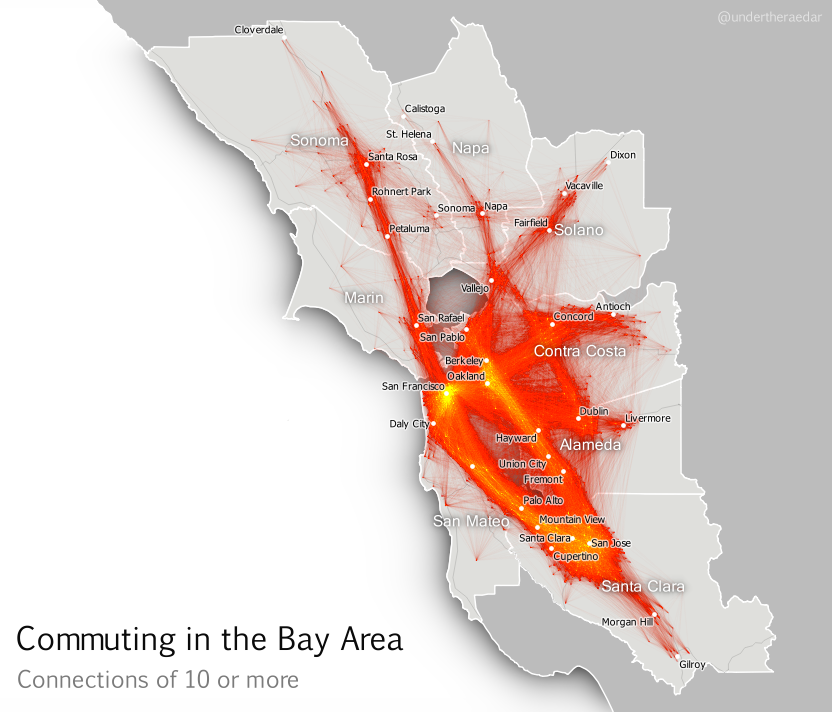
The first example above doesn’t reveal anything like the whole story, though. There are actually quite a lot of commuters who travel in the opposite direction from Santa Clara County to San Francisco but more widely the commuting patterns in the Bay Area – a metro area of around 7.5 million people – resembles a nexus of mega-commuting. This is what I’ve attempted to show below, for all tract-to-tract connections of 10 people or more, and no distance cut-off. The point is not to attempt to display all individual lines, though you can see some. I’m attempting to convey the general nature of connectivity (with the lines) and the intensity of commuting in some areas (the orange and yellow glowing areas). Even when you look at tract-to-tract connections of 50 or more, the nexus looks similar.

Click image to view larger version

Stronger connections - click image to view larger version


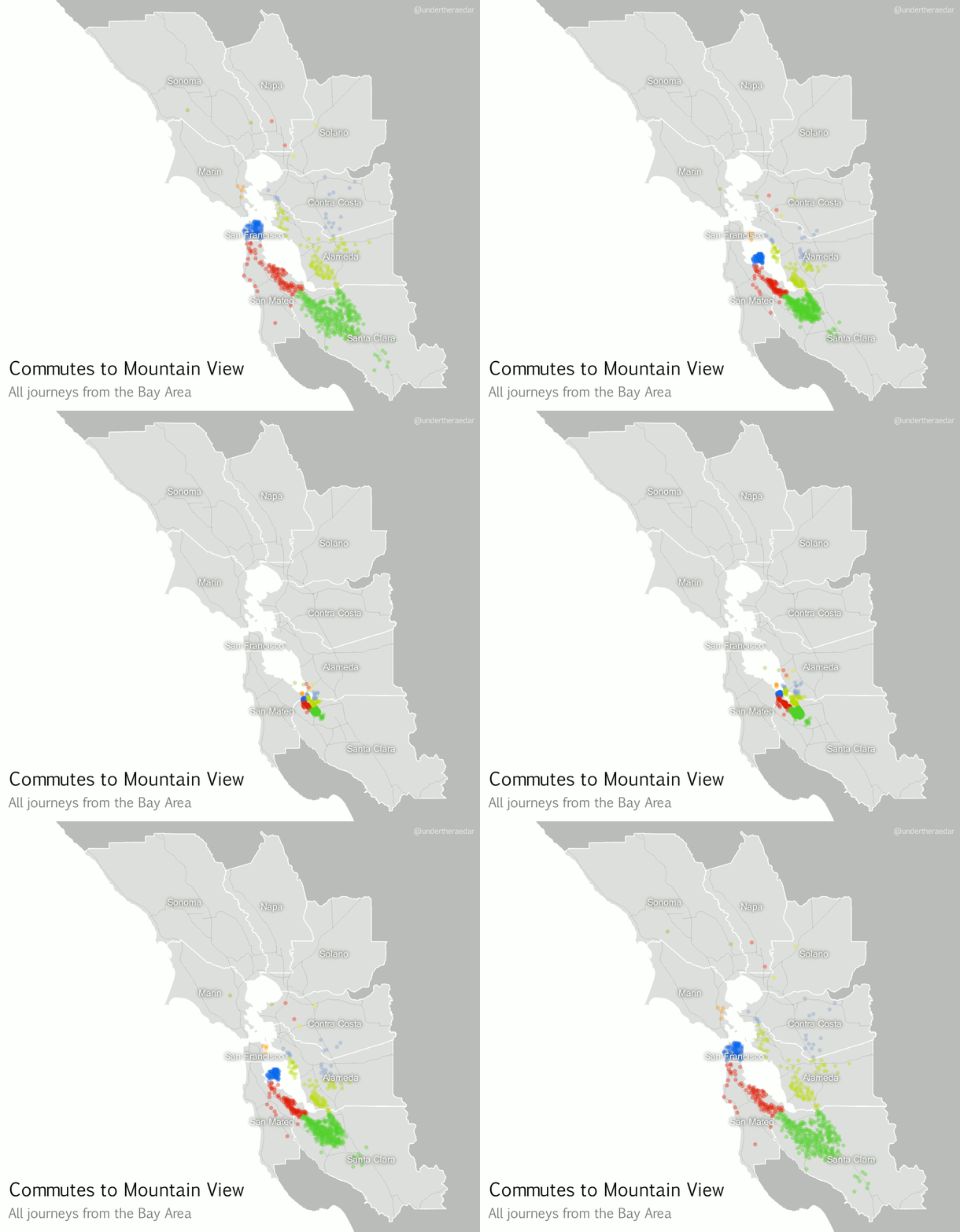
If we zoom in on a particular location, using a kind of ‘spider diagram’ of commuting interactions, we can see the relationships between one commuter destination and its range of origins. In the example below I’ve taken the census tract where the Googleplex is located and looked at all Bay Area Commutes which terminate there, regardless of distance. In the language of the seminal Chicago Area Transportation Study I mentioned above, these are ‘desire lines’ since this represents ‘the shortest line between origin and destination, and expresses the way a person would like to go, if such a way were available’ (CATS, 1959, p. 39) instead of, for example, sitting in traffic on US Route 101 for 90 minutes. According to the data, this example includes just over 23,000 commuters from 585 different locations across the Bay Area. I've also done an animated line version and a point version, just for comparison.

Commuting connections for the Googleplex census tract

Animated spider diagram of flows to Mountain View

Just some Googlers going to work (probably) mp4


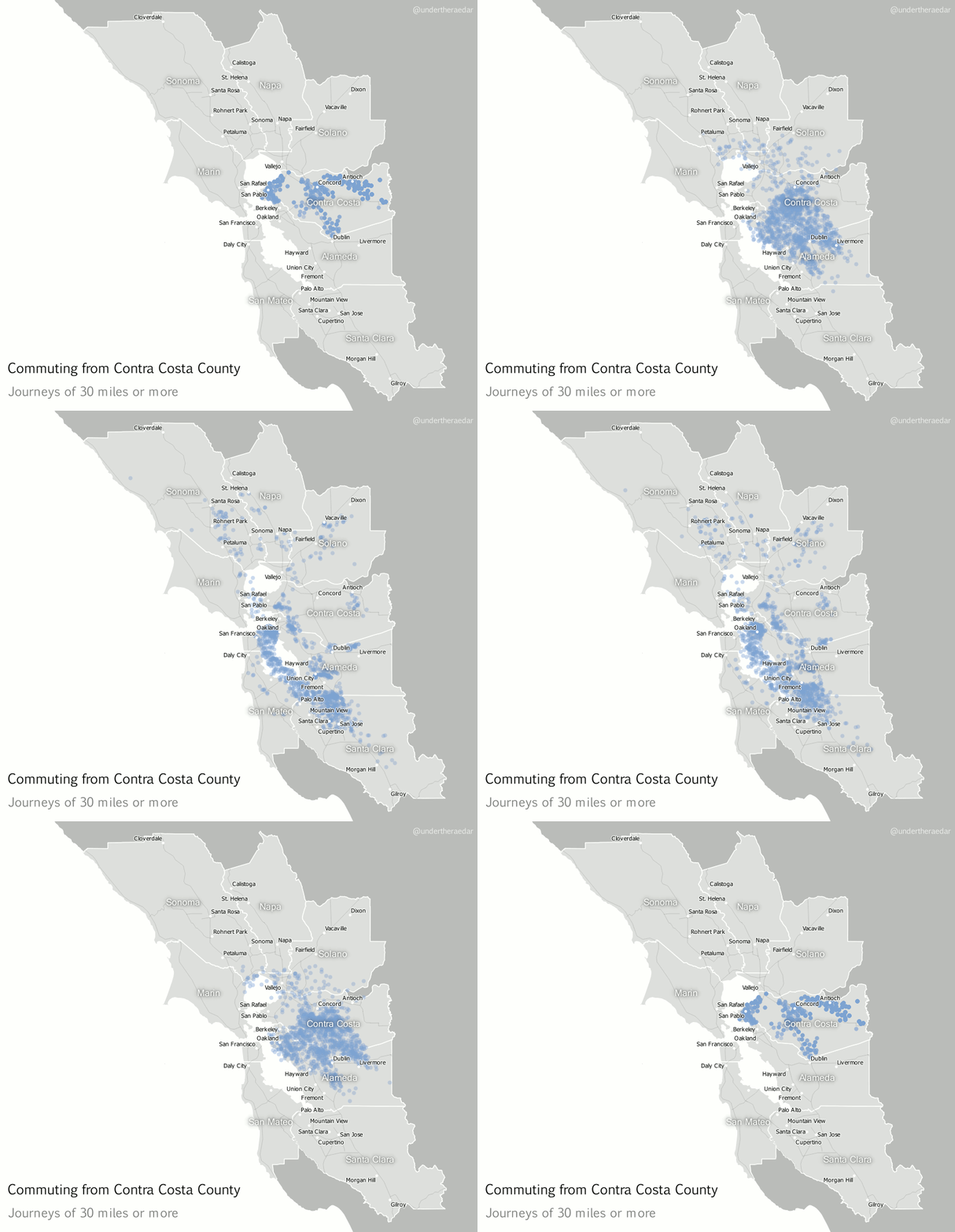
Looking further afield now, to different parts of the Bay Area, I also produced animated dot maps of commutes of 30 miles or more for the other three most populous counties – Alameda, Contra Costa and Santa Clara. I think these examples do a good job of demonstrating the polycentric nature of commuting in this area since the points disperse far and wide to multiple centres. Note that I decided to make the dots return to their point of origin – after a slight delay – in order to highlight the fact that commuting is a two way process. The Alameda County animation represents over 12,000 commuters, going to 751 destinations, Contra Costa 25,000 and 1,351, and Santa Clara nearly 28,000 commuters and 1,561 destinations. The totals for within the Bay Area are about 3.3 million and 110,000 origin-destination links.

Alameda County commutes of 30+ miles mp4


Contra Costa County commutes of 30+ miles mp4


Santa Clara County commutes of 30+ miles mp4


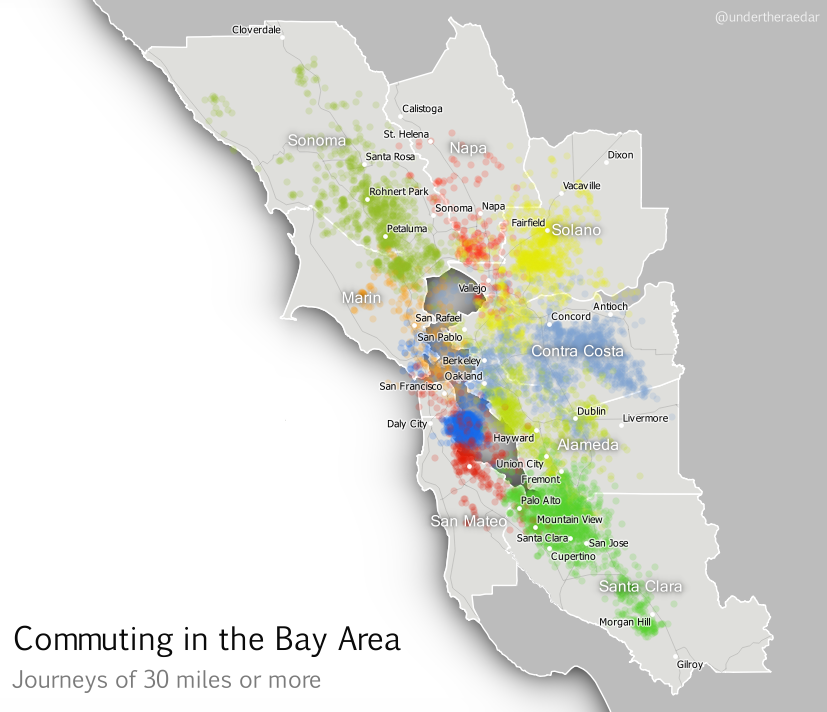
Finally, I’ve attempted something which is a bit much for one map, but here it is anyway; an animated dot map of all tract-to-tract flows of 30 or more miles in the Bay Area, with dots coloured by the county of origin. Although this gets pretty crazy half way through I think the mixing of the colours does actually tell its own story of polycentric urbanism. For this final animation I’ve added a little audio into the video file as well, just for fun.

A still from the final animation - view here

What am I trying to convey with the final animation? Like I said, it's too much for a single map animation but it's kind of a metaphor for the messy chaos of Bay Area commuting (yes, let's go with that). You can make more sense of it if you watch it over a few times and use the controls to pause it. It starts well and ends well, but the bits in the middle are pretty ugly - just like the Bay Area commute, like I said.

My attempts to understand the functional nature of polycentric urbanism continue, and I attempt to borrow from pioneers like Waldo Tobler and the authors of the Chicago Area Transportation Study. This is just a little map-based experimentation in an attempt to bring the polycentric metropolis to life, for a region plagued by gruesome commutes. It’s little wonder, therefore, that a recent poll suggested Bay Area commuters were in favour of improving public transit. If you're interested in understanding more about the Bay Area's housing and transit problems, I suggest watching this Google Talk from Egon Terplan (54:44).


Notes: the data I used for this are the 2006-2010 5-year ACS tract-to-tract commuting file, published in 2013. Patterns may have changed a little since then, but I suspect they are very similar today, possibly with more congestion. There are severe data warnings associated with individual tract-to-tract flows from the ACS data but at the aggregate level they provide a good overview of local connectivity. I used QGIS to map the flows. I actually mapped the entire United States this way, but that’s going into an academic journal (I hope). I used Michael Minn’s MMQGIS extension in QGIS to produce the animation frames and then I patched them together in GIMP (gifs) and Camtasia (for the mp4s), with IrfanView doing a little bit as well (batch renaming for reversing file order). Not quite a 100% open source workflow but that’s because I just had Camtasia handy. The images are low res and only really good for screen. If you’re looking for higher resolution images, get in touch. It was Ebru Sener who gave me the idea to make the dots go back to their original location. I think this makes more sense for commuting data.

The Cartographatron: Information and images on the 'Cartographatron' used in the Chicago Area Transportation Study (1959) are shown below.


From p.39 of CATS, 1959, Vol 1


From p.98 of CATS, 1959, Vol 1


Friday, 16 August 2013

Mapping flows in ArcGIS

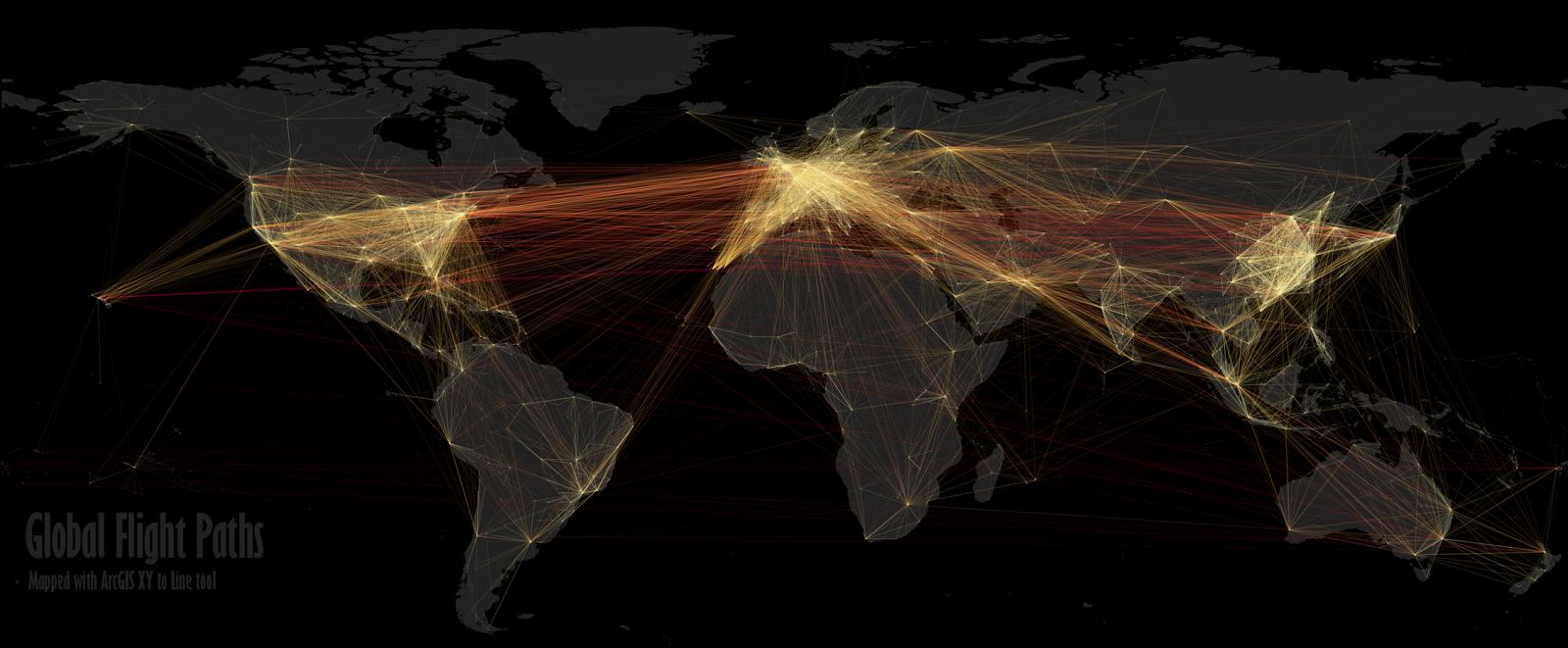
This short post is about the process of flow mapping in ArcGIS and not really about the end results - though the maps are quite interesting. I've done quite a bit of flow mapping in the past and am now getting ready to work on the next set of Census flow data in the UK (which should be out in November) so I've been experimenting with some tools. I've written about this in the past in papers in Computers, Environment and Urban Systems and also Environment and Planning B but those papers are a bit long-winded! Other people have produced beautiful flight path maps so I thought I'd experiment with the same data using the relatively new ArcGIS XY to Line tool in version 10.0 (it can be found in ArcToolbox - Data Management Tools - Features - XY to Line at the bottom of the list of tools). For more on other methods and previous iterations of this kind of thing take a look at the work of Nathan Yau, Michael Markieta or James Cheshire.


For anyone wanting to map flows in ArcGIS, Michael Markieta's tutorial is probably a good place to start but be prepared for things to go awry in ArcGIS... When I mapped the 59,000 or so flight paths in the map above using XY to Line and one single dbf file (or csv, etc. - it makes no difference) the resulting shapefile only contained 16,066 rows. This happened every time I tried it and a couple of times my shapefile had only 73 rows. Another time it had ~14,000. That's why Markieta recommends splitting the file up - although I just cut it up into chunks of 16,000. Interestingly, I ran into exactly the same problem with my CEUS paper a few years back using Glennon's flow data model tool - though the limit was about 32,000 before it cut off. 

Another very annoying feature of XY to Line (for me at least) is that when you choose the Great Circle option under 'Line Type' it takes much longer to compute and the resultant shapefile is enormous. The shapefile for flight paths in the above map is about 10MB whereas the great circle version was over 450MB for one 16,000 chunk alone. Not sure if anyone else has run into this but it doesn't seem like a very efficient way of doing things! [Edit - as @baeing has reminded me, it's because shapefiles don't support curves - though geodatabases do.]

Once I had my complete shapefile I moved to QGIS, added in a world layer from Natural Earth and then experimented a little with symbology. I also experimented with different styles and projections to produce some of the maps below. That's all for now - I just hope ESRI are able to improve upon the current version of XY to Line because when it does work it is really fast (on my machine at least) and straightforward.

Very similar to above, minus text

Short haul, different projection

Short haul, different projection, borders

Slightly different symbology

And, yes, I know that flights from Australia or New Zealand typically go over the Pacific rather than the long way round! I'm just showing the XY to Line outputs as they are in this post.

Thursday, 16 September 2010

Filtering Flow Data

My adventures in spatial interaction visualisation continue. I'm currently finalising some more of this work in a paper I'm writing and it gets quite complicated so I've tried to think of ways to simplify the patterns within the vast datasets I've been working with.

The image below shows inter-district migration in the UK for 2001 at different flow magnitudes in a very short animation. This is just one example of the kind of visual things I've been working on recently.


Monday, 13 September 2010

Flow Map Layout

I've been experimenting with mapping flow data (again) and this time have been looking at Flow Map Layout, by Phan et al. at Stanford. There is a short paper on it, and a slideshare presentation, but basically it offers a slightly different approach to flow mapping.

I experimented using UK commuting data for 2001. I looked at the top 50 flows (by district) into Greater London. This equates to more than 550,000 commuters going in to London but it excludes intra-London moves obviously. It's a bit tricky at first when you are trying to get used to it but when you do you can produce some nice images... Click on the image below to see it full size.

You can move things around in the (basic) mapping interface and it is actually quite flexible. There are some display options for colours and edge routing, etc.

The largest inflow was from Epping Forest, with around 26,000 commuters.

Thursday, 18 February 2010

London Commuting Surface in 3D

I've moved on from some of my original flow mapping work of 2008/09 and am now working on different kinds of things. However, I came across some interesting work on geovisualisation at The University of Manchester Geospatial blog which made me want to revisit previous work.

In particular, the reference to a short population density animation caught my attention.

In short, I have experimented with 3D animated geovisualisations - in this instance it is of my London flow surface and flow lines using commuting data. There's a short video below (it may take a moment or two to load - it's a large file).

Tuesday, 9 June 2009

Mapping Commuting Patterns

Moving on from my earlier work on mapping migration with flow maps, I've now begun to think about mapping commuting. So, rather than look at residential mobility I'm focusing on labour market dynamics. Actually, I find this more interesting and there has been some good work on this recently - for example, by Nielsen and Hovgesen in 2005 and 2008.

Even more recently than this (May 2009), Killer and Axhausen of ETH in Zurich produced a paper on Mapping Overlapping Commuting Areas. It is very interesting and even mentions my 2009 paper on flow mapping (though I wrote about migration and not commuting)!


So, a new flow-mapping-related project is in the works... Look out for more in the future.

Friday, 23 January 2009

Flow Map Finale!

I've written quite a bit about flow mapping on these blog pages. It's only been a sideline of mine in terms of research but has consumed a lot of my time over the past year or so (well, more like three or four). So, one final image, embedded in Google Maps. This one shows gross flows of migrants between Glasgow wards from 2000 to 2001 (gross flows = two-way; that is, the total flow in both directions between two wards). Click on individual lines for more information. If you want to see the map full size in Google Maps, click the link below this smaller version and it will open.


View Larger Map

Monday, 19 January 2009

Still working on things

January has been pretty quiet on the blogging front, but that's because I've been working on papers. One of these is in revision and the other is a new piece of work based on my PhD writings (but it's taken on new life too).

Anyway, more on the former. I'm attempting to revise a paper on flow mapping and to make things more interactive and more effective so I decided that I would build a small site in google sites and then put links to content there. So, if you're at all interested in flow mapping, kml, google sites, GIS, spatial interaction or anything closely related to any of these it may be of interest. If not, it does look quite nice.

There's an introductory page, some information about the data, a few colour maps, direct links to kml files overlaid onto google maps and some links to the KML files on my web space. There's also a few words about me and about the project that all this came from. As you can see, I've also added a slightly psychedelic banner. Link to site here.


In future, I plan to blog a lot more on non-flow-mapping-related issues. It's just that for the past year or so this has been a big part of my work. That's all for now...

Thursday, 6 November 2008

Yet another flow mapping post...

The reason for another of these posts is that I've been contacted by various people in different parts of the world (the USA, Australia, England) about flow mapping; how to do it, what to use it for and so on. Well, I think much more development is needed. I also need to keep blogging but I've been busy recently - poor excuse though. So, more results of my experiments in flow mapping... all of which use migration data from the 2001 UK Census.

First we have flow lines for the United Kingdom, at district level and then along the side I show different link magnitudes. This map shows 'gross' flows. That is, the flow lines represent the total link between two places (so, if A to B = 100 and B to A = 50, the gross link = 150).


On the second map, I've shown the same data but at ward level (n.b. there are about 430 districts and about 10,000 wards - as you'll understand, the migration matrices are pretty big). I've had to filter it to show only flows of 12 or more otherwise it's a jumbled mess.


On the third map, I've shown this data just for South East England, in the area surrounding London. This illustrates, to varying degrees of success, the level of functional polycentricity which exists in relation to household mobility.


Finally, I've attempted something different. I've produced a smooth surface raster, based on 2.5km cells, of all ward level migration. In some ways it is a success, but we can never really overcome all the limitations of 2D display. However, it does tell a story.

Thursday, 4 September 2008

The New vs. the Old - Flow Mapping

Back again to a familiar topic - flow mapping. In the past all we had was paper and two dimensions. Now we have e-everything and things can easily be displayed in three dimensions (or 2.5D as we say in the GIS world). The reason for this post is that I'm currently revising some maps for a journal and I have come to the conclusion that some things just can't be effectively displayed in a static, old fashioned manner - they must be made interactive to work properly.

The map below shows about as much as it is possible to show in a traditional geovisualisation of migration. Here I have shown all moves into Manchester (the local authority) between 2000 and 2001, with reciprical links (i.e. where people have moved both in and out along the flow line path) in red, with unique inflows in yellow. I'm busy with other things now, and am still working a lot on the e-learning and screencasting side of things, so time to go...

Tuesday, 29 April 2008

CommuterView, ONS, etc.

I got back to work after a week away and in my mail I discovered a new DVD from ONS. This was the CommuterView DVD I had been waiting for. What is it? It's an interactive flow mapping tool showing all commuting flows in the UK from the 2001 census, down to LSOA level. It's very interesting and is similar to the kinds of things I've previously done with migration data.

Another important development is that from April 1, 2008 the Office for National Statistics became the executive agency of the new UK Statistics Authority (UKSA). The UKSA is accountable to parliament rather than a government minister (as ONS was). The aim of this is to restore public trust in the quality and integrity of official statistics. They also have some pretty new logos.

Yesterday I received an interesting e-mail from a PhD student at MacQuarie University in Australia asking about flow mapping techniques, but they are looking at communication linkages in settlements in Bangladesh rather than migration/commuting in the UK. I'm going to try and be of help as it sounds interesting and any kind of global communication on flow mapping is surely a good thing.

What else? I've also been exploring the new tools available in Google spreadsheets and the 'heatmaps' in particular. These could be very useful tools indeed but I couldn't find a quick and easy way to resize my maps and there are still quite a few restrictions. Not a replacement for doing similar things in GIS but an interesting development. Still waiting on my new copy of Camtasia Studio 5. I'm working with 3 at the moment and plan to produce a 'how to use Camtasia' demo eventually - this will involve a screencast of screecast software. This is possible if you have two separate versions installed, just as it is possible to run Excel 2003 and 2007 on the same machine, for example.

Wednesday, 16 April 2008

Flow Mapping Frenzy

One of the GIS areas I'm really interested in is flow mapping, or dynamic mapping as some people call it. I did a lot of this in my PhD and am now in the process of writing a paper about it. This is also part of the reason I'm getting into VBA. Here's an example:


This map is an extract from a much, much larger dataset that has nearly 1 million flow lines in it. On the left the image shows inflows to Manchester from 2000 to 2001 and the other one shows outflows from 2000 to 2001. I like to think of this as the migration footprint of Manchester and even though many of the lines represent very little movement, the spatial extent is quite large. The message here, I suppose, is that everywhere is connected to everywhere else, but near places moreso (Waldo Tobler's First Law, anyone?). So, I'm into flow mapping, but only really as one more way of helping us to understand the way our world works. Although, I do have to admit that the nerd in me actually enjoys the technical side of it all too. There's really lots of different ways to do this kind of thing in GIS, but I used ArcGIS 9.x and Alan Glennon's Flowtools. I also hear that ONS are doing something similar to this with their new data visualisation unit - so have to see how that develops in due course.

My next paper is going to be much less technical. My post-PhD publication plan is to get 4 papers from my thesis and so far I've completed two quite technical pieces. Now I want to get back to the actual topic itself (spatial effects of regeneration initiatives in North West England). I might write something here about this soon...